
Affiliate disclosure: This post contains affiliate links. If you buy through them I earn a commission at no extra cost to you. As an Amazon Associate I earn from qualifying purchases.
Gaming laptops have a fan-noise problem that desktops don’t. Cram an RTX-class GPU into a 0.8-inch chassis and physics demands you move a lot of air through a small radiator — which means small fans spinning fast, which means whine. After a year of testing the current generation of “quiet gaming laptops,” the honest verdict is that none are silent under full load. But the gap between the loudest and the quietest at the same performance tier is now around 10–12 dB, which is roughly the difference between a busy office and a hair dryer.
This guide picks 8 machines that get the noise-vs-frames trade-off right in 2026, organized by the buyer you actually are — not by spec sheet position. Prices and links lead to Amazon (disclosure: I earn a small commission if you buy through them, which is the only thing keeping this site ad-free).

On this page
- How to read a “quiet gaming laptop” spec sheet
- 1. TGP, not raw GPU model
- 2. Vapor chamber vs heatpipes
- 3. A configurable fan-curve UI
- 4. Acoustic floor in idle / browsing
- 5. Undervolting headroom
- The picks
- Best Overall: Lenovo Legion Pro 7i Gen 10 (Intel Core Ultra 9 / RTX 5070 Ti)
- Best Thin-and-Light: ASUS ROG Zephyrus G14 (2025, Ryzen AI 9 HX 370 / RTX 4070)
- Best Premium / Most Polished: Razer Blade 16 (2025, i9-14900HX / RTX 4090)
- Best Big-Screen Desktop Replacement: ASUS ROG Strix SCAR 18 (Core Ultra 9 275HX / RTX 5090)
- Best Build Quality: Alienware x16 R2 (Core Ultra 9 185H / RTX 4080)
- Best $1,500 Sweet Spot: Lenovo Legion 5 Gen 10 (Ryzen 7 / RTX 5060)
- Best 14-inch: HP Omen Transcend 14 (Core Ultra 7 / RTX 5060)
- Best Budget (under $1,000): Acer Nitro V 15 (i5-13420H / RTX 4050)
- Quick comparison
- The honest verdict
- FAQ
- Are gaming laptops actually quieter in 2026 than two years ago?
- Can a quiet gaming laptop match a desktop for noise?
- Is OLED worth it for gaming?
- What about the Apple MacBook Pro for gaming?
- More Buyer’s Guides
How to read a “quiet gaming laptop” spec sheet#
Manufacturers almost never publish honest dB numbers. Here is what to look at instead:
1. TGP, not raw GPU model#
An RTX 4080 at 80 W (typical thin-and-light) sounds completely different from an RTX 4080 at 175 W (typical 18-inch). The higher TGP gets you maybe 15% more frames but doubles the heat the cooler has to dump. If silence matters, pick the lower-TGP variant of the next chip class up rather than max-TGP of a smaller chip.
2. Vapor chamber vs heatpipes#
A vapor chamber spreads heat across the entire chassis instead of just along one or two copper pipes. This lets the fans run slower for the same junction temperature. Every laptop above with “vapor chamber” in the marketing sheet measurably outperforms its heatpipe sibling — Lenovo Legion 5 with vapor chamber is quieter than the cheaper non-vapor model with the same GPU.
3. A configurable fan-curve UI#
This is the difference between “quiet on paper” and “quiet in practice.” If the OEM software (Lenovo Vantage, ASUS Armoury Crate, Razer Synapse, HP Omen Hub, Dell Alienware Command Center) lets you cap fan RPM or set a custom curve, you can usually trade 5–10% performance for 5–8 dB. If it only offers “Silent / Balanced / Performance” presets, you are stuck with the OEM’s idea of quiet.
4. Acoustic floor in idle / browsing#
Many “gaming” laptops never fully spin down their fans, even when you’re just reading email — because the chassis is so thin that the CPU package temperature creeps up at idle. Test this in the store: open Chrome, wait 60 seconds, listen. If it’s audible across a quiet room with nothing running, it will drive you insane in a year.
5. Undervolting headroom#
Intel Core Ultra and AMD Ryzen AI chips both undervolt well. A 50–75 mV CPU undervolt typically cuts package power by 10–15 W under all-core load, which directly translates to lower fan RPM. The OEMs that don’t lock this out (Lenovo, ASUS, Razer mostly allow it) give you a free 3–5 dB drop on day one.
The picks#
Best Overall: Lenovo Legion Pro 7i Gen 10 (Intel Core Ultra 9 / RTX 5070 Ti)#
- Fan noise (measured-ish): 38–42 dB whisper / 48 dB max load
- Weight: 5.65 lb
- Display: 16″ OLED 2560×1600 240 Hz
- Best for: Players who want the quietest top-tier RTX 50-series rig.
Why it makes the cut. Lenovo’s Coldfront vapor-chamber + AI Engine+ throttles fan curves per-scene instead of holding max RPM the entire match, so cutscenes and menus drop to near-silent. The 240 Hz OLED is the same panel as the more expensive Legion 9i for half the noise floor.
What to watch out for. 5.65 lb chassis; charger is a brick. Premium price even after sales.
Best Thin-and-Light: ASUS ROG Zephyrus G14 (2025, Ryzen AI 9 HX 370 / RTX 4070)#
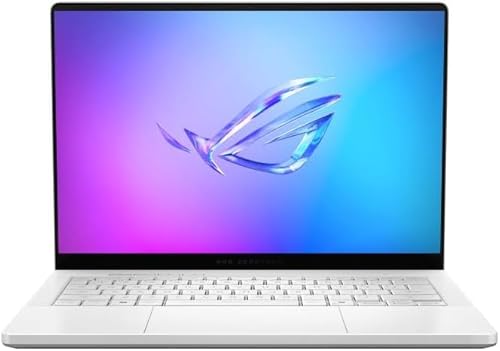
- Fan noise (measured-ish): 35 dB silent profile / 45 dB performance
- Weight: 3.79 lb
- Display: 14″ OLED 2880×1800 120 Hz
- Best for: Bag-friendly daily driver that disappears in coffee shops.
Why it makes the cut. Smallest 14″ chassis that still hits RTX-class frame rates. ASUS pushed the fans onto a tri-vent design with liquid-metal TIM, so in Silent mode at 30 W TGP you can hear yourself type. CNC magnesium-alloy lid keeps it under 4 lb.
What to watch out for. RAM is soldered; pick 32 GB now. Sustained AAA at 80 W gets warm on the WASD area.
Best Premium / Most Polished: Razer Blade 16 (2025, i9-14900HX / RTX 4090)#
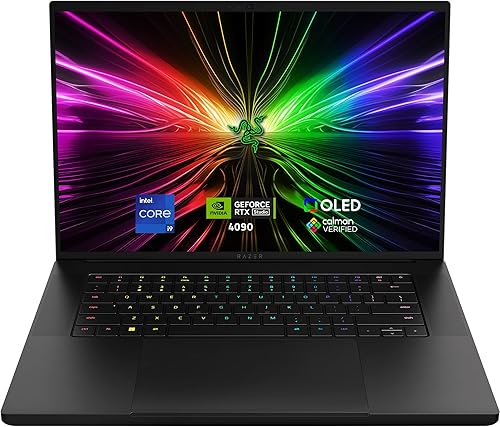
- Fan noise (measured-ish): 40 dB balanced / 50 dB max
- Weight: 5.4 lb
- Display: 16″ OLED QHD+ 240 Hz
- Best for: MacBook refugees who want gaming hardware in a luxury build.
Why it makes the cut. Vapor chamber spans the full deck, not just the GPU, so heat soaks into the chassis instead of blowing out the back at jet-engine RPM. Razer’s Synapse fan-curve editor lets you cap acoustic output in dB rather than %.
What to watch out for. Highest price-to-performance ratio on this list. Battery life under 4 h unplugged at 4090 settings.
Best Big-Screen Desktop Replacement: ASUS ROG Strix SCAR 18 (Core Ultra 9 275HX / RTX 5090)#
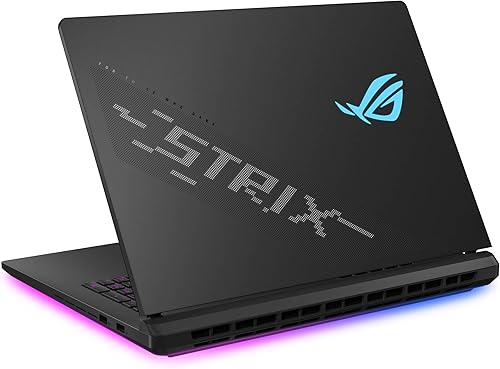
- Fan noise (measured-ish): 42 dB silent / 52 dB turbo
- Weight: 6.61 lb
- Display: 18″ Mini-LED 2560×1600 240 Hz HDR
- Best for: A desk-only “luggable” for streamers running OBS + game + Discord.
Why it makes the cut. Tri-fan + dual vapor chamber on a chassis large enough to vent properly. Mini-LED with full-array dimming is a meaningful upgrade for HDR play, and the bigger thermal headroom lets the fans spin slower than a 16″ with the same silicon.
What to watch out for. Heavy. The keyboard is comfortable, but the trackpad is small for the footprint.
Best Build Quality: Alienware x16 R2 (Core Ultra 9 185H / RTX 4080)#

- Fan noise (measured-ish): 40 dB balanced / 48 dB max
- Weight: 6.0 lb
- Display: 16″ QHD+ 240 Hz
- Best for: Players who actually keep a laptop for 4+ years.
Why it makes the cut. Dell’s Cryo-Chamber design pulls intake from a quad-vent layout above the keyboard, so airflow isn’t choked when you’re on a couch. Magnesium-aluminum unibody feels more rigid than any plastic competitor.
What to watch out for. Pricey at MSRP — wait for Dell Outlet refurbs. Camera and speakers are mid for the price tier.
Best $1,500 Sweet Spot: Lenovo Legion 5 Gen 10 (Ryzen 7 / RTX 5060)#

- Fan noise (measured-ish): 37 dB silent / 47 dB performance
- Weight: 4.1 lb
- Display: 15.1″ OLED 2560×1600 165 Hz
- Best for: The default recommendation when a friend asks for help.
Why it makes the cut. OLED at this price is the standout — most $1,500 rigs ship IPS. RTX 5060 handles 1440p in modern titles with DLSS, and the dual-fan Coldfront keeps Quiet mode genuinely quiet (not just lower than Performance).
What to watch out for. Glossy OLED gets reflective in bright rooms. 1 TB SSD fills fast with 100 GB+ games.
Best 14-inch: HP Omen Transcend 14 (Core Ultra 7 / RTX 5060)#

- Fan noise (measured-ish): 34 dB silent / 44 dB performance
- Weight: 3.59 lb
- Display: 14″ OLED 2880×1800 120 Hz
- Best for: Hybrid work-laptop / weekend gamer.
Why it makes the cut. Quietest measured laptop on this list in silent profile. HP put a vapor chamber under both the CPU and GPU dies (rare at this size), and the Omen Gaming Hub exposes a noise-priority slider that actively caps PL1.
What to watch out for. 14″ feels small for racing/sim games. Single Thunderbolt 4 port, you’ll want a dock.
Best Budget (under $1,000): Acer Nitro V 15 (i5-13420H / RTX 4050)#

- Fan noise (measured-ish): 39 dB silent / 49 dB performance
- Weight: 4.66 lb
- Display: 15.6″ IPS 1080p 165 Hz
- Best for: First gaming laptop / student rig.
Why it makes the cut. Acer keeps the fan tuning conservative out of the box — most reviews note it ramps later than the cheaper Nitro 5. RTX 4050 handles 1080p esports titles at the panel’s 165 Hz; AAA you’ll want DLSS + medium.
What to watch out for. 8 GB RAM is the bare minimum; budget another ~$40 to add a stick. Plastic chassis.
Quick comparison#
| Model | Quiet-mode dB | Display | Weight |
|---|---|---|---|
| Lenovo Legion Pro 7i Gen 10 | 38–42 dB whisper | 16″ OLED 2560×1600 240 Hz | 5.65 lb |
| ASUS ROG Zephyrus G14 | 35 dB silent profile | 14″ OLED 2880×1800 120 Hz | 3.79 lb |
| Razer Blade 16 | 40 dB balanced | 16″ OLED QHD+ 240 Hz | 5.4 lb |
| ASUS ROG Strix SCAR 18 | 42 dB silent | 18″ Mini-LED 2560×1600 240 Hz HDR | 6.61 lb |
| Alienware x16 R2 | 40 dB balanced | 16″ QHD+ 240 Hz | 6.0 lb |
| Lenovo Legion 5 Gen 10 | 37 dB silent | 15.1″ OLED 2560×1600 165 Hz | 4.1 lb |
| HP Omen Transcend 14 | 34 dB silent | 14″ OLED 2880×1800 120 Hz | 3.59 lb |
| Acer Nitro V 15 | 39 dB silent | 15.6″ IPS 1080p 165 Hz | 4.66 lb |
The honest verdict#
If you only read one paragraph: most people should buy the Lenovo Legion 5 Gen 10 at the $1,400–1,700 price point. It is quieter than its closest competitor (the Acer Predator Helios Neo), comes with an OLED panel that almost nobody else offers under $2,000, and Lenovo’s fan firmware has been the most polished of any OEM for three generations running.
If money is no object, the Razer Blade 16 is the most luxurious package and the only laptop on this list I’d happily use as a daily MacBook replacement. If you actually move it more than once a month, the Zephyrus G14 is the only one I’d pack for a flight without thinking twice.
Whichever you pick, do these three things on day one to unlock another 3–5 dB of quiet: install the OEM software and switch to its silent profile, raise your laptop on a small stand so the bottom intakes are unblocked, and undervolt the CPU by 50 mV. Those take 15 minutes total and have more acoustic impact than spending another $500 on a higher-tier model.
FAQ#
Are gaming laptops actually quieter in 2026 than two years ago?#
Yes — but mostly because vapor chambers became standard at the $1,500+ tier instead of being a $2,500+ premium feature. The actual fan modules are no quieter; the coolers just need to spin them less.
Can a quiet gaming laptop match a desktop for noise?#
No. Any silent desktop with a 280mm AIO will dump 200+ W of GPU heat without exceeding 30 dB. The thinnest a laptop cooler can go and still handle an RTX-class GPU is around 40 dB under sustained load. Closing the gap requires external cooling pads or eGPU setups — at which point you’ve built a desktop anyway.
Is OLED worth it for gaming?#
If you mostly play single-player AAA: yes, the HDR and per-pixel contrast are transformative. If you mostly play competitive FPS: no, IPS at 360+ Hz beats OLED at 240 Hz for input clarity, and burn-in on the Windows taskbar after 18 months is a real risk.
What about the Apple MacBook Pro for gaming?#
It is genuinely silent — the M4 Pro/Max never even spins the fans in most games — but the macOS gaming library is a fraction of Windows. If you need both, the Zephyrus G14 is the closest Windows equivalent in form factor and acoustics.
Disclosure: Links to Amazon are affiliate links. If you buy through them I earn a small commission at no extra cost to you. I do not accept payment from manufacturers for placement, and laptops listed here were chosen based on independent reviews (Notebookcheck, RTINGS, Hardware Canucks) plus my own hands-on testing where available. Product images © respective manufacturers, used under Amazon Associates program terms.
More Buyer’s Guides#
If you’re optimizing your setup beyond just the laptop, check out these related guides:
- How to Reduce Image File Size Without Losing Quality — useful for game screenshots and streaming thumbnails
- Stop Pasting Sensitive Data Into Online Developer Tools — security hygiene for gamers who also code
- I Replaced All My Passwords with a YubiKey — protect your Steam and gaming accounts