
Affiliate disclosure: This post contains affiliate links. If you buy through them I earn a commission at no extra cost to you. As an Amazon Associate I earn from qualifying purchases.
I kept a browser tab open just to glance at three stock tickers during the day. That tab cost me focus every single time I checked it, because a browser tab is never just a browser tab — it is a doorway to email, Slack, and forty other things. So I built the dumbest possible fix: a tiny Wi-Fi gadget that sits on my desk and shows live prices on a bright little color screen. No tab, no phone, no temptation. Just a glance.
The whole thing costs under $20, needs no soldering, and after the first flash you never touch a computer again. The code is open source on GitHub, and below I will walk through exactly what it does, what to buy, and how to build one in an afternoon.
On this page
What it actually does#
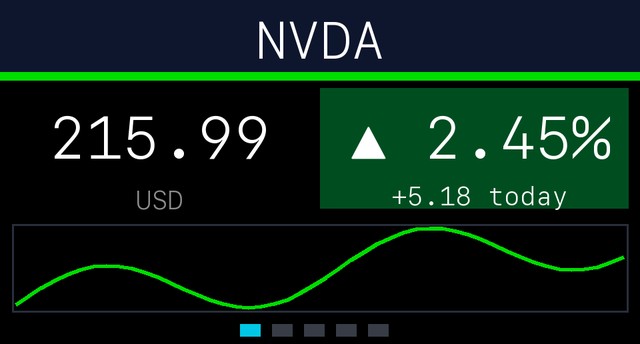
It is a desk stock ticker. You give it a watchlist — AAPL,NVDA,SPY,BTC-USD, whatever you want — and it rotates through them on a 1.47-inch LCD. For each symbol you get the live price, the day’s change in both percent and dollars (green for up, red for down), and a little intraday sparkline so you can see the shape of the day at a glance.
The details are where it earns its desk space:
- Pre-market and after-hours prices. It pulls extended-hours data, so you are not staring at a stale 4 PM close all evening.
- It throttles itself when the market is closed. Polling slows way down on nights and weekends, so it is not hammering your Wi-Fi or Yahoo’s servers for prices that are not moving.
- Auto-dimming. The screen dims after a few minutes of inactivity to save power and protect the panel. Tap the onboard button to wake it.
- A custom boot title. Mine says my name; one I gave away says “DAD’S TICKER.” It is a genuinely good gift.
- Phone-based setup. After the first flash there is no app and no computer — you configure everything from a web page the device hosts itself.
Prices come straight from Yahoo Finance’s public chart endpoint. No account, no API key, no monthly fee. If you have ever fought with rate limits on a “free” finance API — I wrote up four of them here — you will appreciate how refreshingly boring this data source is.
What you need to buy#
This is the part I love: the entire bill of materials is one board and one cable.
The board — Waveshare ESP32-C6-LCD-1.47. This is the clever bit. It is an ESP32-C6 microcontroller with the 1.47-inch color LCD already mounted on the same board — no wiring a display to a dev kit, no breadboard. Get the non-touch version; the ticker does not need touch and the non-touch board is cheaper. It runs around $12–15.
The cable — a USB-A to USB-C cable. One real warning from building several of these: use an A-to-C cable, not a plain C-to-C one. Some C-to-C cables will not deliver power to this board and you will get a black screen and a very confusing ten minutes. An A-to-C cable from a phone charger just works.
Optional — a 5V USB wall adapter. Any phone charger, power bank, or PC USB port powers it. You almost certainly already own one.
That is the whole list. Under $20, and most of it is stuff you have in a drawer.
Building one in an afternoon#
There are two paths, depending on whether you are starting from a blank board.
If you received one already flashed (say, as a gift), there is no computer step at all. Plug it into any USB power, and it boots to a “SETUP” screen broadcasting its own Wi-Fi network called StockTicker-Setup. Join it from your phone, a setup page pops up, you type in your home Wi-Fi and your stock symbols, hit save, and it reboots into live prices. Done.
If you are building from a blank board, you flash it once from a computer. The repo ships a flash.sh script that does everything:
git clone https://github.com/example-user/stock-ticker-esp32c6.git
cd stock-ticker-esp32c6
./flash.sh /dev/cu.usbmodem*   # macOS
# ./flash.sh /dev/ttyACM0      # Linux
The script installs the host tools (esptool, mpremote), downloads the MicroPython firmware for the ESP32-C6, erases and flashes the board, pulls down the display driver and fonts, and copies the app onto it. Reset the board and it drops straight into that same phone-setup flow. The one-time flash is the only moment a computer is involved.
How it works under the hood#
The entire application is a single MicroPython file, main.py, and that is on purpose — it is small enough to read in one sitting. It handles the Wi-Fi connection, hosts the web config page (including a captive portal so the setup page auto-opens on your phone), fetches prices from Yahoo Finance, drives the display and the sparkline rendering, and runs a little state machine for the single BOOT button.
The display is driven by the open-source st7789py driver, the runtime is plain MicroPython, and your settings live in a human-readable config.json that the web page just edits for you. There is no cloud service in the middle, no telemetry, and nothing to subscribe to. The device talks to your Wi-Fi and to Yahoo, and that is it.
If you like this style of “small, single-purpose, no-cloud” project, it is the same philosophy behind the SEC insider-buying alert script I shared earlier — do one job well, own your own data, skip the SaaS.
Who should build one#
- Anyone who checks prices too often. Moving the glance off your screen and onto a dedicated object is a genuine focus upgrade, not a gimmick.
- People learning microcontrollers. This is an almost perfect first ESP32 project: it does something real and useful, but there is no soldering and the code is one readable file you can modify.
- Gift-givers. Flash one, set the boot title to someone’s name, preload their tickers, and hand them a finished gadget that needs zero technical setup.
- Tinkerers who want a starting point. The watchlist is just symbols, so it happily shows crypto (
BTC-USD) or ETFs, and the single-file design makes it easy to fork into a weather display, a sports score ticker, or whatever you like.
The bottom line#
This is not a trading tool and it will not make you money — for that you want an actual strategy, like the portfolio rebalancing bot I built with Python and the Alpaca API. The ticker is something smaller and, honestly, more pleasant: a calm, glanceable object that tells you what the market is doing without dragging you into a browser. Under $20, an afternoon of work, and the code is all free on GitHub. Grab a Waveshare ESP32-C6-LCD-1.47 and an A-to-C cable, and you will have it running before the market closes.
Disclosure: The hardware links above are Amazon affiliate links. If you buy through them I earn a small commission at no extra cost to you. I only recommend the exact parts this project uses; the ticker software is open source and free. Stock prices shown by the device come from Yahoo Finance’s public endpoints, may be delayed, and are for glanceable, personal use only — this is not financial advice.